
People go looking for a HeyGen alternative for two very different reasons, and only one of them is solved by finding a different avatar tool.
If the problem is price, or voice quality, or the avatar library, or the editor — then yes, there are competitors and swapping is straightforward.
But if the problem is that your character can never quite be in the scene, no avatar tool will fix that, because it is a limit of the entire category rather than of one product.
The distinction that decides everything
Avatar generators — HeyGen, and the OmniHuman class of audio-driven tools — do one thing extremely well: they take a face and an audio track and produce a person talking, with accurate lip movement, in front of a background.
The word doing the work is in front of.
The character is composited against a backdrop. She does not pick anything up. Nothing in the environment reacts to her. She cannot walk behind a pillar, be jostled by a crowd, or lean on a table that exists in the same generation as she does. For a training video, a product explainer, a localised sales message — none of that matters, and the category is the right answer.
For anything where the character has to act within a place, it is the wrong tool no matter which vendor you pick. We tested this class specifically and rejected it on principle: perfect sync, no scene integration, and scene integration was the whole requirement.
Ask one question: does your character need to touch the world she is in? If no, stay in the avatar category and shop on price and voice. If yes, you need a video model that generates the performance and the scene together — a different product entirely.
The four ways to get a mouth moving, ranked
Tested in production on a project that needed a recurring photoreal character speaking scripted dialogue inside historical settings.
1. Generation-native sync — the mouth performs in the scene
Some video models now accept an audio track alongside your reference images and generate the performance around it. The character is not composited; she is generated speaking, in the environment, with the rest of the shot reacting normally.
This is the only approach that passes as a real performance. It costs roughly $3 per fifteen-second talking shot, which is a lot per second and cheap against the alternative of not being able to do it at all.
Quirks worth knowing before you budget: there is usually an audio minimum of about two seconds, so short lines need padding. The render’s own audio is a sync guide, not your final track — swap the clean recording back in at assembly. And do not mux silent renders, because they drift.
2. Cloned-voice re-performance
Some engines take your reference audio and re-perform the line in a cloned voice rather than carrying your exact track. Cheaper per second than the above, and in our testing the clone passed the ear test comfortably.
The catch is control: you are not getting your recording back, you are getting a convincing impression of it. Fine for most work, wrong if the exact take matters.
3. Post-process lip-sync
Generate the video, then run a tool that re-animates the mouth to match an audio track.
We rejected this. The result has a pasted-on-mouth quality that is hard to unsee once noticed, and one tool we tested padded short clips by playing the footage backwards, which is exactly as bad as it sounds.
4. Avatar generators
Sync is excellent. Integration is impossible. See above — right tool, specific job.
The trick the good channels use
Worth knowing because it inverts the obvious workflow.
The intuitive approach is audio-first: record your voiceover, then force the video to match it. That is what we did, and it made everything harder — it constrains every generation to a fixed timing you cannot negotiate with.
Creators working in this format at volume do the opposite. They generate the dialogue in-pass with whatever voice the model produces, then apply a single voice-clone swap across every clip afterwards — ElevenLabs is the usual tool for that step, and one locked voice ID applied at the end is far less work than forcing every generation to match a track. The video is free to perform naturally; the voice is unified in one step at the end.
Our audio-first pipeline was self-inflicted difficulty that nobody else in the format was choosing.
If what you actually want is a consistent character
A lot of “HeyGen alternative” searching is really about character consistency — the same face, shot after shot. Avatar tools give you that trivially, because there is only ever one image being animated. Video models make you work for it.
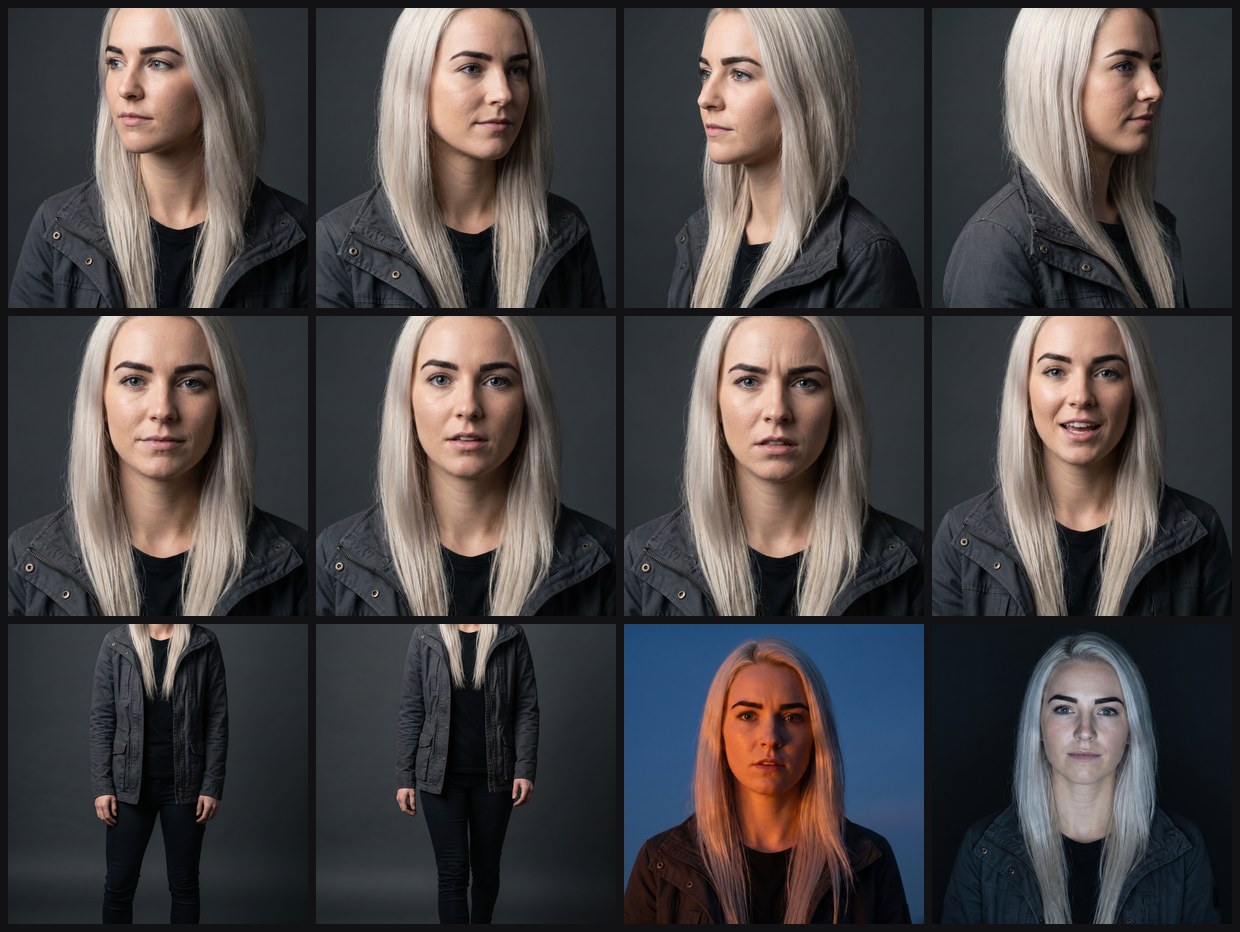
anchor image rather than from each other. Turns, profiles, four expressions, full body, and two
lighting conditions.
What worked for us:
- One anchor image. Generate candidates from a single portrait template, pick one, and derive everything from that file. Never chain edits — drift compounds with every generation removed from the source.
- A reference pack of about twelve shots — turns, profiles, expressions, full body, lighting variants — all generated from the anchor.
- References must be a neutral character sheet, never a scene image. One scene photo used as a reference made every subsequent shot re-open on that scene’s setting.
- Ban mid-distance framing. When the character gets small in frame, the face re-synthesises generic. Close, medium, or true-wide only — the zone in between is where identity dies.
- Judge faces at thumbnail scale. Compare candidates at around 320px, because that is where your audience actually meets them.
Do those five things and a general video model will hold a character well enough for long-form work. Skip them and no model will, regardless of price.
So, which alternative
Talking head against a background, at volume, in many languages: stay in the avatar category. HeyGen’s competitors do the same job and you should shop on price, voice library and editing workflow.
A character who exists in a place: leave the category. You want a video model with reference-to-video and audio support, plus the consistency discipline above. It costs more per second and takes more setup, and it is the only thing that produces the result.
Not sure yet: storyboard one scene honestly. If the character touches anything, moves through anything, or reacts to anything, you already know.
Method
Approaches tested June–August 2026 in production, not from demos. Model capabilities in this area change fast — generation-native audio support in particular went from rare to common within months, so re-check what your preferred model does before assuming it cannot.
Part of our AI video tools comparison — three categories, priced, and which one you are actually shopping in.
More on that step, and whether video models generating their own audio replaces a voice tool at all: ElevenLabs alternatives.